



Feature
A driver app built for employee transport trips
Drivers see the trips assigned to them, open each employee stop, call or navigate to it, and verify boarding.
Every stop, in the order of the route.
The driver app lists each assigned trip with its type, time, trip ID, route, duration, and the cab registration and model. Ongoing trips are colour-coded, so the one in progress is easy to find.
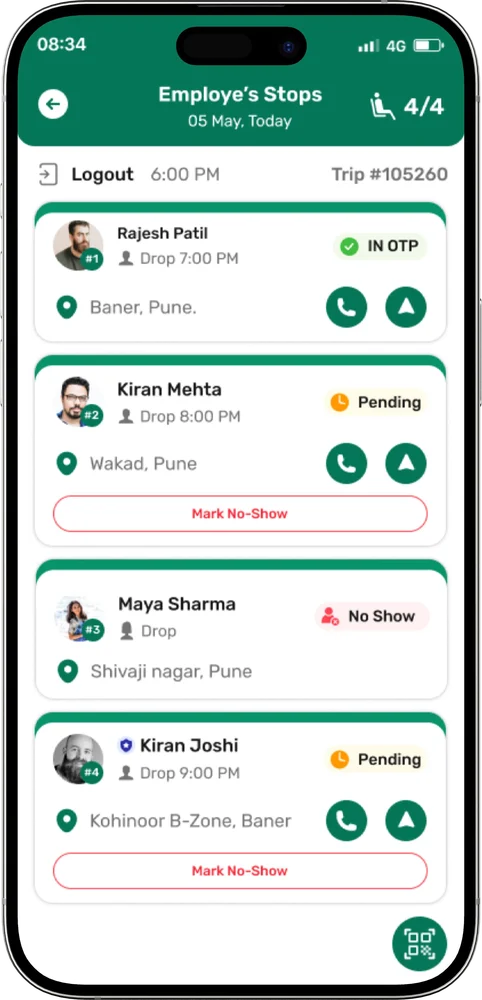
Inside a trip, Ride With shows every employee, the seat count and the status of each stop. From a stop the driver can call the employee, open navigation with one tap, and verify boarding by scanning a QR code or typing the OTP.
What drivers can do
Assigned trips
Trip type, time, trip ID, route, duration and the cab details.
Employee stops
Open Ride With to see each employee, the seat count and every stop’s status.
Navigation
One tap opens navigation to the employee stop.
Call employee
Call the employee straight from the stop.
OTP verification if enabled
Scan the employee’s QR code or type the OTP they give you.
Reports
Trip history by date range, downloadable as a PDF.
SOS and mark no-show are shown only if your organization has enabled them.
A driver’s day in the app
- 1Sign in and allow location. Location permission, location service and Allow all the time let the app track the vehicle.
- 2Open the assigned trip. See the route, time and cab details.
- 3Go to each stop. Navigate or call the employee from the stop.
- 4Verify boarding. Scan the QR or type the OTP.
- 5Review trip history. Pick a date range and save the report as a PDF.
Common questions
Can drivers call employees from the app?
Yes. The driver can call the employee straight from the stop.
Why does the app ask for location access?
So the vehicle can be tracked during the trip. Drivers can’t continue without the location permissions the app asks for.
Is there an SOS option?
SOS and mark no-show are shown only if your organization has enabled them. Where enabled, SOS lets the user call the admin, with call masking.
Contact
Make every employee journey easier to manage.
Tell us about your transport operation and we will walk you through ShuttleMate.