



Feature
Live vehicle tracking for employee transport
See where the vehicle is while the trip is running. Admins watch the whole operation on a map, and employees follow their own vehicle from the app.
Know where every vehicle is.
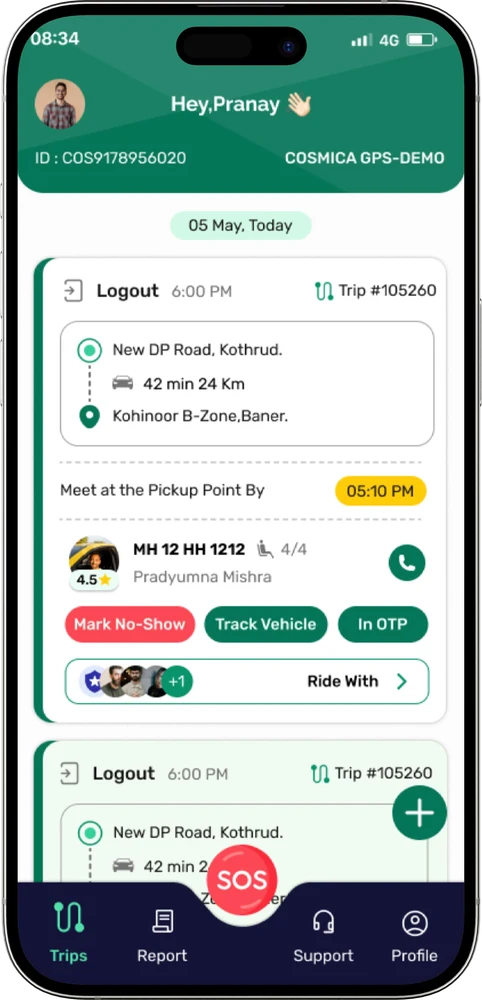
In ShuttleMate the transport team can watch vehicles live on a map from the admin web application, and look back at map history afterwards. Employees tap Track Vehicle on their trip to see where their ride is, so they are not guessing at the pickup point.
Tracking works through the driver app. After sign-in the app asks the driver for the permissions it needs, and drivers cannot continue without them.
What tracking covers
Live map for admins
Watch vehicles on a map from the web application.
Employees track their ride
Employees follow their own vehicle from the trip in the app.
Map history
Look back at where a vehicle went after the trip.
Location permission
The driver app needs location permission before the driver can continue.
Location service
Location service has to be on so journeys can be monitored in real time.
Allow all the time
Keeps tracking accurate when the app is closed or in the background.
How tracking works on a trip
- 1Driver signs in. The app asks for location permission and location service.
- 2Trip runs. The vehicle’s location is available to the transport team on the live map.
- 3Employee follows along. Tap Track Vehicle on the trip to see where the vehicle is.
- 4Admin monitors. Watch the trip from the web application as pickups happen.
- 5Review later. Use map history to look back at the journey.
Common questions
Where does the vehicle location come from?
From the driver app on the driver’s device. That is why the app asks for location permission, location service and Allow all the time.
Can employees see the vehicle?
Yes. Employees can track their vehicle from the trip in the app.
Is map history available?
Yes. Admins can look back at map history in the web application.
Contact
Make every employee journey easier to manage.
Tell us about your transport operation and we will walk you through ShuttleMate.