



Feature
OTP and QR boarding verification for employee transport
A boarding check at the start of the ride and a deboarding check at the end, each with an OTP or a QR code.
Know who boarded, and who got off.
Employees see both a QR code and an OTP in the employee app. When they board, the driver scans the QR code with the in-app scanner or types the OTP, and the status becomes In-OTP Verified.
The OUT OTP button appears once IN is verified. At drop-off the employee shows the OUT OTP or QR and the driver verifies it, which sets the status to In-Out OTP Verified.
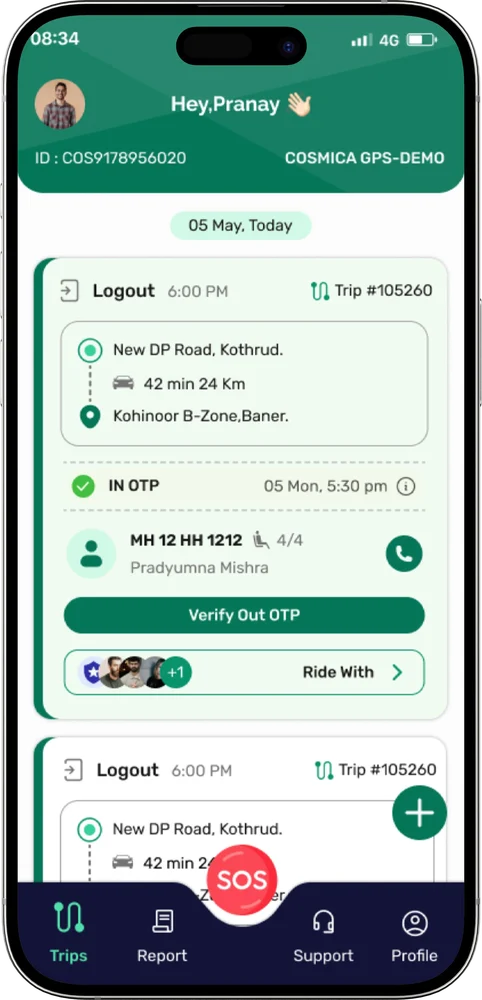
How verification works
IN OTP at boarding
The employee opens IN OTP and shows the code or QR to the driver.
In-OTP Verified
The driver scans or types the code, and the status updates.
OUT OTP at drop-off
The OUT OTP button appears once IN is verified. The driver verifies it at the drop.
In-Out OTP Verified
A completed ride is marked In-Out OTP Verified.
17-seater vehicles
A QR code is attached to the vehicle. Tap IN OTP, scan the vehicle’s code, and boarding is verified. OUT OTP works the same way.
No-show if enabled
Drivers can mark an employee as a no-show when they are not at the stop.
OTP buttons appear only if your organization has enabled them.
A verified ride, step by step
- 1Employee opens IN OTP. Shows the OTP or the QR code.
- 2Driver verifies boarding. Scans the QR or types the OTP. Status becomes In-OTP Verified.
- 3The ride runs. The OUT OTP button appears once IN is verified.
- 4Employee shows OUT OTP. At the drop, shows the OUT OTP or QR.
- 5Driver verifies deboarding. Status becomes In-Out OTP Verified.
Common questions
Does the driver have to scan a QR code?
No. Drivers can use the in-app scanner or type the OTP the employee gives them.
What happens on a 17-seater?
A QR code is attached to the vehicle. The employee taps IN OTP, scans the vehicle’s code to verify boarding, and OUT OTP works the same way.
Is OTP verification always on?
OTP buttons appear only if your organization has enabled them.
Contact
Make every employee journey easier to manage.
Tell us about your transport operation and we will walk you through ShuttleMate.