



Service
Employee roster management for company transport
Employees add their own rosters for one day or several. Those rosters are what the transport team turns into trips.
Plan the ride before the shift begins.
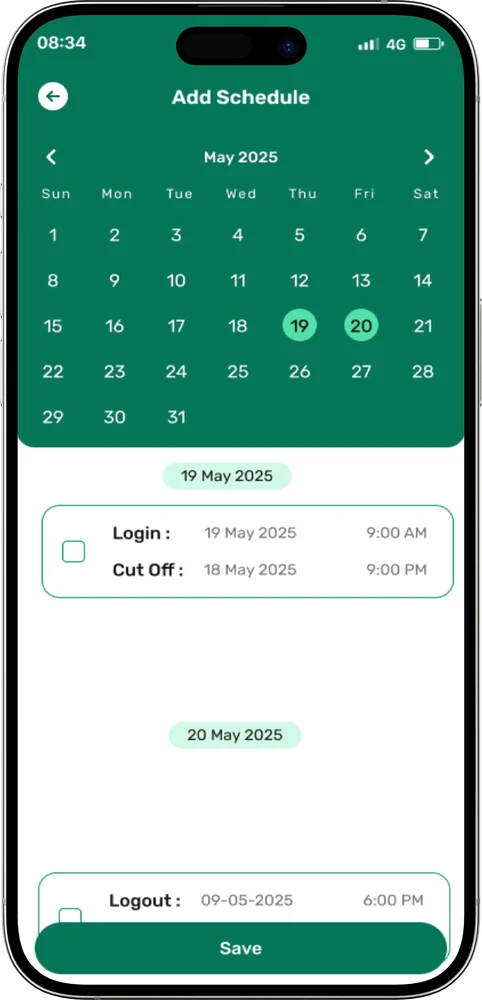
A roster tells the transport team who needs a ride and when. In ShuttleMate, employees create it from the app, picking a single day or several days and adding a login roster, a logout roster, or both.
Rosters have to be in before the employee cut-off time, which gives the transport team a fixed point to plan trips from. When the team prefers to handle it centrally, admins can upload rosters in bulk instead.
What you get with rostering
One day or several
Pick a single day or a run of days in one request.
Login and logout rosters
Add a login roster, a logout roster, or both.
Employee cut-off time
Rosters have to be submitted before the cut-off, so planning starts from a fixed list.
Bulk upload
Admins can upload rosters as a CSV when they would rather not enter them one by one.
Addresses stay current
Admins keep employee addresses up to date so pickups are planned from the right place.
Rosters become trips
Assigned trips show up in the employee app once the transport team has planned them.
From request to ride
- 1Request a roster. Create a roster from the app, or have admins upload one in bulk.
- 2Select dates. Pick a single day or several days.
- 3Schedule the trip. Add a login roster, a logout roster, or both, before the employee cut-off time.
- 4Receive the trip. Assigned trips show up in the app.
- 5Travel. Check the route, call the driver and watch the vehicle.
Common questions
Can admins upload rosters for employees?
Yes. Admins can upload rosters in bulk with a CSV.
Is there a deadline for employees to submit rosters?
Yes. Rosters have to be in before the employee cut-off time.
Can one request cover several days?
Yes. Employees can select a single day or several days when they roster.
Contact
Make every employee journey easier to manage.
Tell us about your transport operation and we will walk you through ShuttleMate.